 Pryse
PryseRebate Management in Dynamics 365: Features, Costs & When to Use It
Understand D365 Supply Chain Management's Rebate Management module, implementation costs, limitations, and when to choose standalone rebate management software instead.
Dynamics 365 Supply Chain Management includes rebate management capabilities through its Rebate Management module, which creates contracts, deals, or agreements between businesses and customers or vendors to calculate rebates, deductions, and royalties, tracking and maintaining rebate transactions in a central location where users can effectively create, review, and process them.
The module is included with D365 Supply Chain Management subscriptions at no additional licensing cost, making it attractive for distributors and manufacturers already using the platform. According to Microsoft's official documentation, rebate transactions are automatically generated based on the calculation method selected and scheduled in batch jobs.
However, D365's rebate capabilities have limitations compared to standalone rebate management platforms like Enable, Vendavo, or Flintfox. The challenge is understanding when D365's built-in rebate tracking is adequate and when your program complexity justifies investing in specialized rebate management software costing $50K-$200K+ annually.
This post explains what D365's Rebate Management module actually does, its limitations for complex rebate programs, implementation costs beyond the "included" license, and when distributors and manufacturers should choose standalone rebate management software instead.
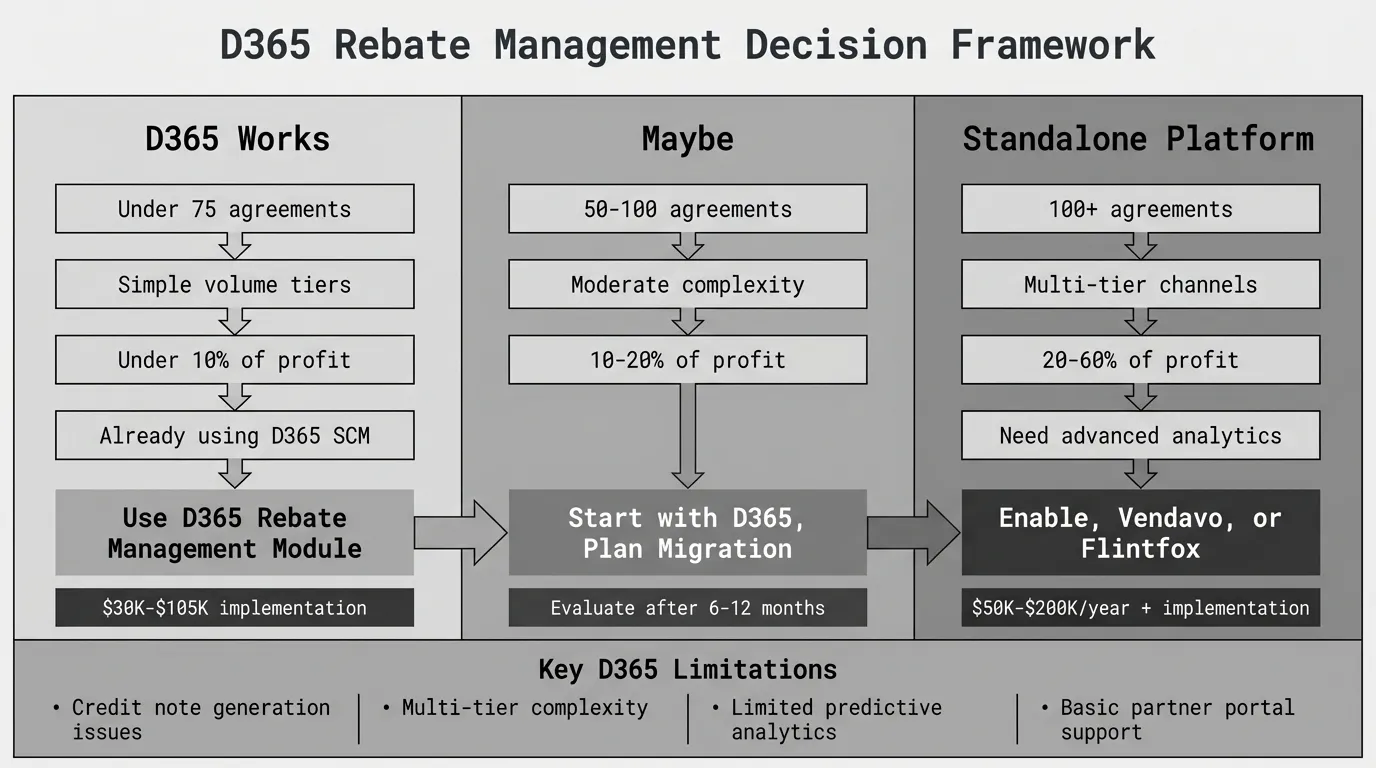
What D365 Rebate Management Does
The Rebate Management module automates rebate calculation and accrual tracking for customer rebates, customer royalties, and vendor rebates across your business.
Core Rebate Management Capabilities
Agreement setup and tracking
Create rebate deals specifying eligible products, customers, or vendors, calculation methods, volume tiers, and agreement periods. According to Microsoft's rebate management deals documentation, you can control different methods and bases for calculating rebates and royalties, including rules for inclusions and exclusions.
Automated rebate accruals
As qualifying sales or purchase transactions process in D365, the system automatically calculates rebate amounts based on active agreements and posts accrual journal entries. Provisions can be managed daily, weekly, monthly, or according to a custom period, with the functionality allocating or paying the rebate at any defined frequency.
According to Boyer & Associates' analysis of D365 rebate management, automated provisioning ensures accurate financial reporting while reducing manual effort required to track rebate liabilities and receivables.
Workflow management
Set up workflows to manage, review, and approve rebate agreements before activation. This ensures proper authorization and compliance with your rebate policy governance.
Claims processing
D365 allows creation of rebate claims against agreements for payment processing. Finance teams can review claims, validate against agreement terms and transaction data, approve payments, and track claim status through resolution.
Financial reconciliation
The module integrates with D365's general ledger for rebate accrual posting, expense tracking, and payment reconciliation. Provisions and write-offs are posted directly to the ledger, and credit notes can be created automatically, providing full integration with accounts payable and accounts receivable.
Reporting and dashboards
D365 provides standard rebate reports showing accrued rebate liabilities and receivables by agreement, partner, product, and time period. Real-time tracking offers transparent visibility into rebate performance and financial impact.
Supported Rebate Types
D365 Rebate Management supports three deal types:
Customer rebates: Based on sales orders, delivery notes, or invoices. Used when you provide incentives to customers based on their purchase volume or performance.
Customer royalties: Based on sales orders, delivery notes, or paid invoices. Used for licensing or intellectual property agreements where you receive royalty payments.
Vendor rebates: Based on purchase orders or sales orders. Track incentives from suppliers based on products you purchase from rebate vendors and sell to customers via sales invoices.
According to Logan Consulting's explanation of D365 vendor rebate agreements, vendor rebates can be calculated based on products purchased from rebate vendors and sold to customers, with the system tracking both the purchase and subsequent sale to determine rebate eligibility.
Calculation Methods
D365 supports four calculation methods for rebate deals:
Cumulative Method: For single calculation levels. The rebate is calculated once for the entire agreement period.
Rolling Method: Computes all feasible levels for the transaction. If numerous levels exist and more than one is met, all levels are applied, but upper thresholds apply to each percentage. This allows for tiered rebate structures where different percentages apply at different volume ranges.
Stepped Method: Computes all feasible levels with each line contributing gradually to reach the total volume. This is useful for incremental tier structures.
Total Method: Applies the percentage of each level to the overall value of products, calculating rebates based on cumulative spend or volume.
According to Microsoft's 2021 Wave 1 release plan, these calculation methods cover most standard rebate program structures used in B2B commerce.
D365 Rebate Management Limitations
While D365 rebate management works for basic to moderate programs, several limitations create problems for companies with high rebate complexity.
1. Automatic Credit Note Generation Issues
According to Dynamics 365 Community discussions, there are limitations to standard D365 customer rebates functionality. During credit note creation, the credit note number doesn't get created automatically and the system leaves the invoice field blank.
This creates manual work for finance teams who must manually enter credit note numbers and reference invoices, defeating the purpose of automation for high-volume rebate processing.
2. Limited Multi-Tier Channel Support
Managing rebates across manufacturer → distributor → dealer chains with separate agreements at each tier is more complex in D365 than in purpose-built rebate platforms.
You must:
- Create separate rebate deals for each tier
- Manually coordinate claims and payments across tiers
- Build custom workflows to prevent double-dipping where partners claim rebates at multiple levels
- Track downstream partner compliance separately from upstream agreements
Standalone rebate platforms like Enable, Vendavo, and Flintfox handle multi-tier rebate cascading natively with built-in coordination and compliance tracking.
3. Basic Analytics and Reporting
D365 rebate management provides standard reports but lacks the advanced analytics found in specialized platforms:
- No predictive forecasting of rebate liability based on historical patterns and current run-rates
- Limited "what if" scenario modeling to test different agreement structures
- No AI-powered insights identifying which rebate programs drive the most incremental volume
- Basic partner segmentation by rebate performance
- No fraud detection algorithms identifying suspicious claim patterns
According to Microsoft's documentation on streamlining rebate management, D365 focuses on operational efficiency and accurate calculations rather than advanced predictive analytics.
4. Customization Complexity for Advanced Requirements
While D365 supports standard rebate structures, complex requirements often need customization:
- Retroactive tier calculations: When crossing a threshold applies the higher rebate percentage to all prior purchases (not just incremental volume), custom logic is required
- Conditional rebate stacking: Applying multiple concurrent rebates (volume + growth + product mix) with complex eligibility rules
- Clawback provisions: Rebates based on sell-through (products sold by distributors to end customers) rather than sell-in (purchases by distributors)
- Compliance-based incentives: Rebates contingent on non-transactional behaviors like maintaining minimum inventory, attending training, or promotional participation
Each customization adds $2,500-$10,000+ in development costs and creates technical debt requiring ongoing maintenance with D365 updates.
5. Limited Partner Portal Capabilities
D365 doesn't include native self-service portals where trading partners can:
- View agreement terms and current performance
- Track progress toward tier thresholds
- Submit claims with supporting documentation
- Download reports and payment histories
Building custom partner portals using Power Portal or external solutions costs $15K-$40K and doesn't match the experience of purpose-built rebate management portals from Enable or Vendavo.
6. Integration Limitations with External Systems
While D365 rebate management integrates well within the Dynamics ecosystem, syncing rebate data with external CRM systems (Salesforce), pricing engines (PROS, Zilliant), or BI platforms (Tableau, Qlik) often requires custom development.
According to Western Computer's 365VendorRebates solution, many D365 users supplement native rebate management with ISV solutions to address integration gaps and advanced functionality requirements.
D365 Rebate Management Costs
The Rebate Management module license is included with D365 Supply Chain Management subscriptions at no additional software cost. However, total cost of ownership includes implementation, customization, and ongoing maintenance.
D365 Supply Chain Management Licensing
According to Microsoft's Supply Chain Management pricing, advanced applications like Supply Chain Management cost approximately $180/user/month (pricing varies by region and enterprise agreement).
Microsoft requires a minimum of twenty full users to configure Supply Chain Management. Additional users who don't need full functionality can be purchased as Team Members for $8 per user per month.
For a typical mid-market distributor with 25 users, annual licensing costs approximately $54,000 ($180/month × 25 users × 12 months). Rebate management is included in this subscription cost.
Implementation Costs
According to MSDynamicsWorld's 2026 implementation cost guide, implementation is often 3-5x the annual licensing cost for enterprise-grade deployments in the US.
For the Rebate Management module specifically, implementation includes:
Configuration and setup: $15K-$50K
- Rebate deal template creation
- Accrual rule configuration
- Posting profile setup
- User permissions and security
- Workflow design
- Calculation method testing
Data migration: $5K-$25K
- Importing historical rebate agreements from spreadsheets or legacy systems
- Mapping legacy rebate data to D365 structure
- Reconciling opening balances for rebate accruals
- Historical transaction imports for baseline calculations
Training: $5K-$15K
- Finance team training on rebate accrual processes
- Procurement team training on vendor rebate agreements
- Sales team training on customer rebate setup
- End-user documentation creation
Testing and validation: $5K-$15K
- Accrual calculation testing against historical data
- Claims workflow testing
- Financial reconciliation validation
- User acceptance testing
Total implementation for rebate management typically ranges from $30K-$105K depending on agreement complexity, number of trading partners, and customization requirements.
Customization Costs
Common rebate management customizations include:
- Retroactive tier calculations: $3K-$8K to apply higher rebate percentages to all prior purchases when thresholds are crossed
- Multi-tier coordination: $8K-$15K for workflows coordinating manufacturer, distributor, and dealer rebate agreements
- Advanced approval workflows: $3K-$6K for conditional claim approvals based on variance thresholds or partner tier
- Custom partner portals: $15K-$40K for self-service rebate claim submission and performance tracking
- Complex calculation logic: $5K-$20K for agreement structures D365 doesn't support natively
Customization costs for moderate rebate complexity typically add $20K-$50K to implementation budgets.
Ongoing Costs
Support and maintenance: D365 support is included with subscriptions, but resolving rebate-specific issues often requires implementation partner assistance at $150-$300 per hour.
System upgrades: D365 releases updates regularly. Testing rebate customizations against new releases and making necessary adjustments costs $3K-$10K annually.
Agreement management: Finance or operations time maintaining rebate agreements, updating terms, and onboarding new trading partners. For companies managing 100+ agreements, this represents 20-40 hours monthly.
When to Use D365 Rebate Management
D365's built-in rebate capabilities work well for companies meeting these criteria.
Ideal Use Cases
Already using D365 Supply Chain Management
If you've invested in D365 for ERP and supply chain management, starting with its rebate management capabilities before evaluating standalone platforms makes sense. The integration is seamless, and the learning curve is lower for teams already familiar with D365.
Simple to moderate rebate complexity
- Managing under 75 active rebate agreements total
- Single-tier or basic multi-tier volume-based rebate structures
- Rebate payments quarterly or annually (not monthly)
- Standard calculation methods without extensive customization
Limited rebate program scope
Rebates contribute under 10% of gross profit, minimizing financial risk from calculation errors or process inefficiency. The cost and complexity of standalone rebate management software exceeds the value recovered through improved tracking.
Vendor rebates primarily
Distributors tracking manufacturer rebates receivable without complex customer rebate programs owed to downstream partners. Vendor rebate tracking is simpler than managing both sides simultaneously.
Clear agreement terms
Rebate agreements with straightforward volume tiers, clear eligibility rules, and minimal exceptions. Complex agreement structures with special provisions, conditional clauses, or frequent mid-term changes strain D365's rebate capabilities.
When D365 Rebate Management Works
A $65M HVAC distributor manages rebates from 12 key manufacturers representing $2.6M annually in vendor rebates (4% of revenue). Rebate structures are volume-based with 3-5 tiers per manufacturer, paid quarterly.
They implemented D365's Rebate Management module in 8 weeks for $42K including configuration, data migration, and training. Finance reconciles rebate accruals monthly and submits claims quarterly, spending approximately 15 hours per quarter on rebate administration.
The module eliminated spreadsheet tracking errors that previously caused $20K-$35K annually in missed claims or reconciliation issues. Implementation paid back in under 18 months.
This scenario represents D365 rebate management's sweet spot—moderate agreement count, straightforward structures, vendor rebates primarily, and rebates contributing a meaningful but not overwhelming portion of profitability.
When to Choose Standalone Rebate Management Software
Several scenarios justify investing in dedicated rebate management platforms costing $50K-$200K+ annually instead of using D365's built-in capabilities.
High Agreement Volume and Complexity
100+ active rebate agreements across both vendor and customer sides create administrative overhead that D365 rebate management struggles to handle efficiently.
Multi-tier volume structures with 6+ tiers and retroactive calculations where crossing thresholds applies higher percentages to all prior purchases, not just incremental volume.
Stacking rebate programs where trading partners qualify for multiple concurrent rebates (volume + growth + product mix + compliance) requiring coordination to calculate total rebate due.
According to our complete rebate management software guide, companies managing this complexity typically recover 2-3% of rebate value through error elimination and better compliance when moving from ERP-based tracking to dedicated platforms.
Multi-Tier Channel Programs
Manufacturers managing rebates across manufacturer → distributor → dealer chains where each tier has different agreements, payment cycles, and reconciliation requirements.
D365 can track basic multi-tier rebates but requires significant customization for complex channel programs. Standalone platforms like Enable, Vendavo, and Flintfox handle multi-tier rebate cascading, prevent double-dipping, and coordinate claims across tiers natively.
Rebates as Core Profitability
When rebates contribute 20-60% of net profit, as they do for many food distributors, electrical distributors, and industrial wholesalers, the financial exposure from calculation errors or missed claims justifies dedicated rebate management infrastructure.
A $180M electrical distributor earns $9.7M annually in manufacturer rebates (5.4% of revenue) representing 38% of their $25.6M annual profit. A 2.5% improvement in rebate capture through better tracking and compliance generates $243K in recovered margin annually.
At this scale, investing $85K annually in Enable or Vendavo rebate management plus $75K implementation creates positive ROI within 12 months through error elimination, missed claim recovery, and improved compliance.
Advanced Analytics Requirements
Companies needing predictive forecasting, "what if" scenario modeling, AI-powered program optimization, or fraud detection won't find these capabilities in D365 rebate management.
Standalone platforms provide:
- Rebate liability forecasting based on historical patterns and current run-rates
- Agreement structure optimization identifying tier thresholds that maximize incremental volume
- Partner segmentation by rebate responsiveness and ROI
- Anomaly detection flagging suspicious claims or unusual purchase patterns
Partner Portal Requirements
Manufacturers or distributors needing self-service portals where trading partners access agreement terms, track progress toward tier thresholds, submit claims with documentation, and download payment histories require standalone rebate platforms.
D365's partner capabilities can be customized for basic rebate visibility at $15K-$40K, but the experience doesn't match purpose-built rebate management portals from Enable, Vendavo, or Conga.
Integrating Standalone Rebate Software with D365
Many companies use D365 as their financial system of record while managing rebate operations in specialized platforms.
Integration Architecture
Typical integration includes:
Transaction data export from D365 to rebate platform
- Scheduled daily or hourly exports of sales orders, invoices, purchase orders, and receipts
- API-based real-time sync for high-velocity transaction environments
- Mapping D365 transaction data to rebate platform agreement structures
Rebate accrual import from rebate platform to D365
- Monthly or quarterly accrual journal entry creation in D365
- Automated posting to rebate liability and receivable accounts
- Reconciliation reporting between rebate platform and D365 general ledger
Claims and payment tracking
- Rebate claims created in dedicated platform
- Payment information synced to D365 for cash application
- Variance tracking between accrued and paid amounts
Agreement master data sync
- Partner and product information maintained in D365
- Synced to rebate platform for agreement setup
- Bidirectional updates when terms change
Implementation Considerations
Integrating standalone rebate management software with D365 adds complexity and cost:
Integration development: $20K-$50K for API setup, field mapping, and testing Ongoing sync maintenance: $4K-$10K annually for troubleshooting and updates Dual system training: Teams need competency in both D365 and rebate platform Data governance: Establishing which system is the source of truth for specific data elements
However, for companies managing 150+ rebate agreements or where rebates contribute 30%+ of profit, the incremental integration cost is justified by improved rebate program management capabilities.
D365 ISV Solutions for Rebate Management
Several independent software vendors (ISVs) have developed third-party solutions to enhance D365 rebate capabilities without full platform replacement.
365VendorRebates by Western Computer
According to Western Computer's solution page, 365VendorRebates is an automated, integrated rebate management system designed for wholesale distributors using D365.
The ISV solution adds:
- Enhanced vendor rebate tracking beyond D365 standard functionality
- Automated rebate accrual posting and reconciliation
- Claims management workflows
- Integration with D365 Finance and Supply Chain Management
Pricing and licensing details require contacting Western Computer directly.
Ellipse Rebates
According to Ellipse Solutions, Ellipse Rebates is designed to streamline and automate complex sales rebates by offering additional functionality including configurable rebate calculations, tiered rebates, and partial rebates.
This ISV solution extends D365 capabilities for companies needing more sophisticated rebate structures without implementing a full standalone rebate platform.
When ISV Solutions Make Sense
ISV rebate solutions for D365 work well when:
- You need moderate enhancements beyond D365 standard rebate management
- Full replacement with Enable or Vendavo exceeds budget or business case
- Maintaining D365 as primary rebate system is a strategic preference
- Rebate complexity is too high for standard D365 but not extreme
ISV solutions typically cost $15K-$50K annually depending on functionality and user count, positioned between D365's included rebate management and $75K-$200K+ standalone platforms.
Alternatives to D365 Rebate Management
Beyond D365's built-in capabilities and standalone enterprise platforms, several alternatives exist.
Excel-Based Tracking
For distributors and manufacturers with under 30 simple rebate agreements, Excel provides basic tracking at zero software cost:
What works: Agreement terms tracking, manual accrual calculations based on transaction exports, claims logging, payment tracking
What doesn't scale: Automated accrual updates, retroactive calculations, multi-tier coordination, forecasting, audit trails
Excel works until you miss a material rebate claim, spend 25+ hours per quarter on tracking, or face partner disputes from calculation discrepancies.
D365 Heavy Customization
Instead of standalone rebate software, some companies extensively customize D365 to handle complexity beyond standard rebate management capabilities.
Investment: $40K-$125K in custom development for advanced calculations, workflow automation, and partner portals
Tradeoff: Avoid ongoing subscription costs of standalone platforms but create technical debt and upgrade complexity. Each D365 release requires regression testing and potential rework of customizations.
This approach makes sense for companies with strong D365 development capabilities in-house or committed long-term to Dynamics as their commercial platform.
Mid-Market Rebate Platforms
Companies between "D365 is adequate" and "we need Enable or Vendavo" can evaluate mid-market rebate management platforms:
Conga Rebate Management: $20K-$60K annually, 1-3 month implementation, integrated with contract lifecycle management
Vistaar SmartRebate: $15K-$40K annually, predictive modeling for trade promotions, mid-market manufacturer focus
Salesforce Rebate Management: $30K-$80K annually, native Salesforce integration, channel partner programs
These platforms provide more rebate-specific capabilities than D365 without the cost and complexity of Enable or Vendavo. See our best rebate management software comparison for detailed vendor analysis.
Should You Use D365 Rebate Management?
Here's the decision framework:
Use D365 rebate management if:
- You already use D365 Supply Chain Management for ERP
- You manage under 75 active rebate agreements
- Rebate structures are simple single-tier or basic multi-tier volumes
- Rebates contribute under 10% of gross profit
- Finance team has capacity for quarterly manual reconciliation
- No multi-tier channel programs requiring coordinated tracking
- Budget constraints limit investment in standalone rebate platforms
Choose standalone rebate management software if:
- You manage 100+ active rebate agreements
- Multi-tier channel programs (manufacturer → distributor → dealer)
- Complex calculations (retroactive adjustments, stacking, clawbacks)
- Rebates contribute 20-60% of net profit
- You need predictive analytics and program optimization
- Partner portal requirements for self-service claim submission
- Finance spends 60+ hours per quarter on manual rebate tracking
- Material financial exposure exists from rebate calculation errors
Maybe—start with D365, plan for migration if:
- You manage 50-100 agreements with moderate complexity
- Rebates contribute 10-20% of gross profit
- Current Excel tracking is failing but rebate program maturity is unclear
- Budget allows for D365 implementation now, standalone platform later
- Want to prove rebate management value before larger software investment
For most mid-market distributors and manufacturers reading this, the answer is: start with D365 rebate management if you already have D365 Supply Chain Management. Document all rebate agreements clearly, implement the module with minimal customization, and track where the system struggles.
After 6-12 months of using D365 rebates, you'll know definitively whether it's adequate or if your program complexity justifies investing in Enable, Vendavo, or another standalone platform.
Next Steps
Before choosing between D365 rebate management and standalone platforms, understand your current rebate economics and margin performance.
Run a margin diagnostic to see your actual pocket price after all rebates and incentives. For $1,499, Pryse provides 24-hour analysis showing:
- True pocket margin by customer and product after rebates
- Where margin leakage occurs and how much is recoverable
- Rebate program effectiveness and ROI
- Whether D365 rebates, standalone platforms, or improved Excel processes make sense
Start with diagnostics. Implement D365 rebate management if complexity is moderate and you already have the platform. Invest in standalone rebate software once you've confirmed material leakage exists, quantified the recoverable opportunity, and documented rebate terms clearly.
For broader rebate program strategy beyond software tools, see our complete rebate management guide covering agreement structures, program design, and optimization best practices.
Sources
- Microsoft Learn: Rebate management module overview - Supply Chain Management
- Microsoft Learn: Rebate management deals - Supply Chain Management
- Microsoft Learn: Rebate management - Dynamics 365 Release Plan 2021 Wave 1
- Microsoft Dynamics 365 Blog: Streamline and automate rebate management to increase margins (2021)
- Dynamics 365 Community: Rebate management overview
- Logan Consulting: Understanding Vendor Rebate Agreement in D365 for Supply Chain Management
- Boyer & Associates: Unlocking the Power of Rebate Management in Microsoft Dynamics 365 F&SCM
- MSDynamicsWorld: Dynamics 365 Finance and Operations Implementation Cost in 2026 (US Guide)
- Microsoft: Supply Chain Management Pricing
- Western Computer: 365VendorRebates - Rebate Management Software
- Ellipse Solutions: Ellipse Rebates - Enhancement for Dynamics AX & 365 for Operations
Last updated: February 24, 2026
Frequently Asked Questions
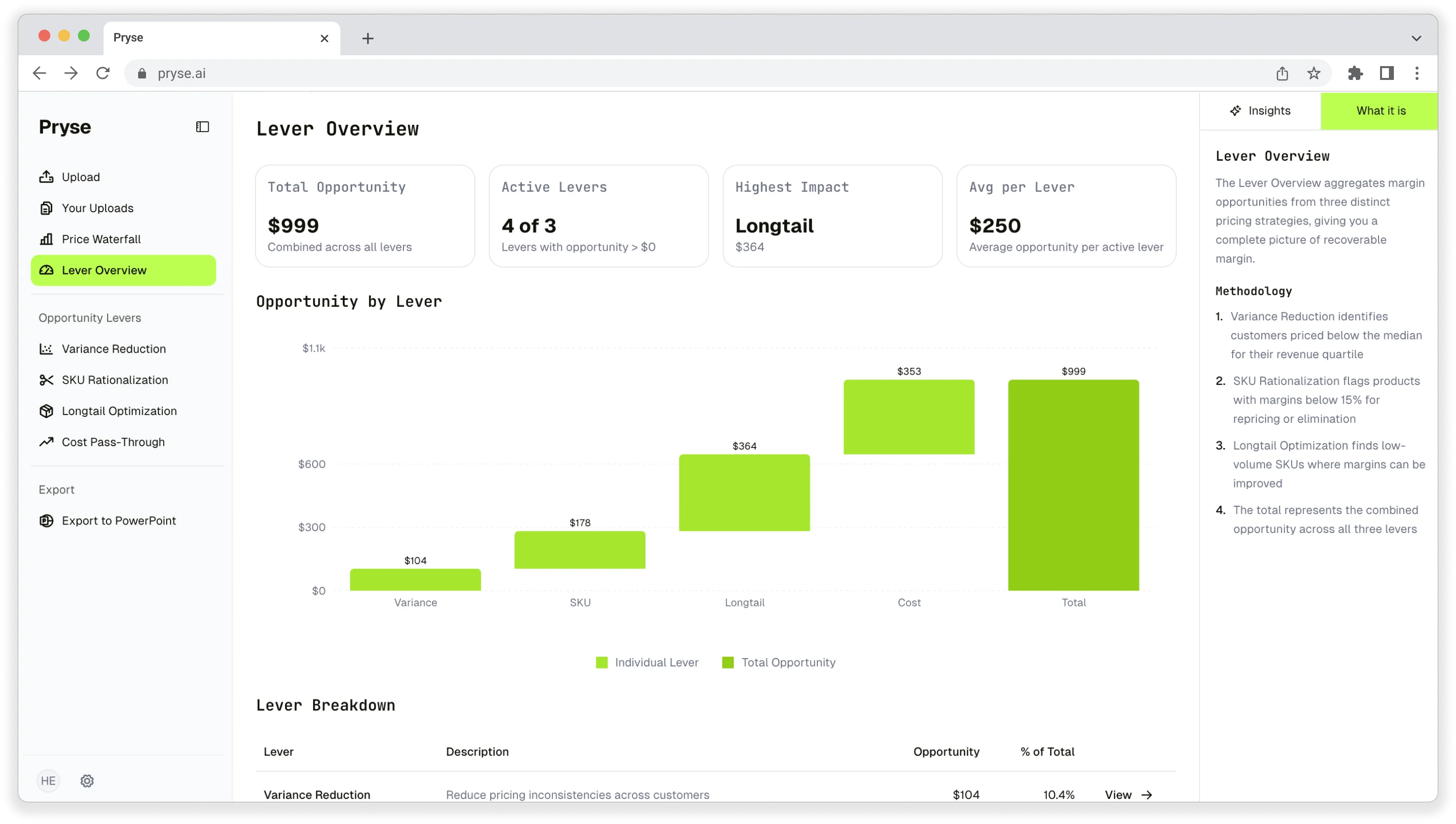
Want to analyze your entire product catalog?
Pryse automatically identifies margin leakage across thousands of SKUs. Upload your data and find hidden profit in 24 hours.
One-time $1,499 diagnostic. No subscription required.