 Pryse
PrysePricing Automation: How to Eliminate Manual Pricing Work
Pricing automation replaces spreadsheets with software that updates prices automatically. Learn when automation delivers ROI, implementation costs, and real results.
Pricing automation uses software and algorithms to automatically set, adjust, and optimize prices by analyzing costs, customer behavior, competitor pricing, and market conditions. It replaces manual spreadsheet-based pricing with automated updates that respond to market changes in minutes instead of weeks.
For mid-market distribution and manufacturing companies, pricing automation sits between "unnecessary complexity we don't need" and "competitive advantage we can't afford to skip" depending on catalog size, pricing velocity, and how much time you currently waste updating spreadsheets.
According to Sciative research, if a competitor drops their price by 10% on a popular product, an automated system can match or beat that price within minutes, while manual pricing might take hours or days to respond. That time gap translates directly to lost sales and margin.
This post explains what pricing automation actually does, when it delivers clear ROI for distributors and manufacturers, real-world implementation costs, and whether you need automation or just better Excel workflows.
What Pricing Automation Actually Does
Pricing automation software handles the work you're currently doing manually in spreadsheets: analyzing costs, checking competitor prices, applying margin rules, and updating price lists across systems.
Core capabilities:
- Automated price updates: Software monitors cost changes, competitor pricing, and market conditions, then updates prices automatically based on rules you define
- Real-time repricing: Adjusts prices continuously for e-commerce and high-velocity businesses instead of quarterly batch updates
- Rule-based logic: Applies pricing formulas consistently (cost-plus margins, competitive positioning, customer-specific discounts)
- Multi-channel synchronization: Updates prices across ERP, e-commerce, CPQ, and sales tools simultaneously
- Error prevention: Validates prices against business rules before publishing (minimum margins, max discount thresholds)
- Audit trails: Tracks who changed what and why for compliance and analysis
What automation replaces:
- Downloading cost files from suppliers and manually updating spreadsheets
- Checking competitor websites weekly to adjust prices
- Copy-pasting price lists between Excel and your ERP
- Calculating customer-specific discounts for every quote
- Fixing pricing errors after they're discovered in lost deals
- Reconciling price list versions across sales, finance, and operations teams
The difference between manual and automated pricing isn't sophistication—it's speed and consistency. According to DealHub, automated pricing systems use sophisticated mathematical models that are constantly updated based on changing market conditions, while manual processes introduce inevitable errors like misplaced decimal points, outdated competitor data, or forgotten price updates.
Manual Pricing vs Automated Pricing: The Real Comparison
Here's what actually changes when you automate pricing.
Time and Resource Efficiency
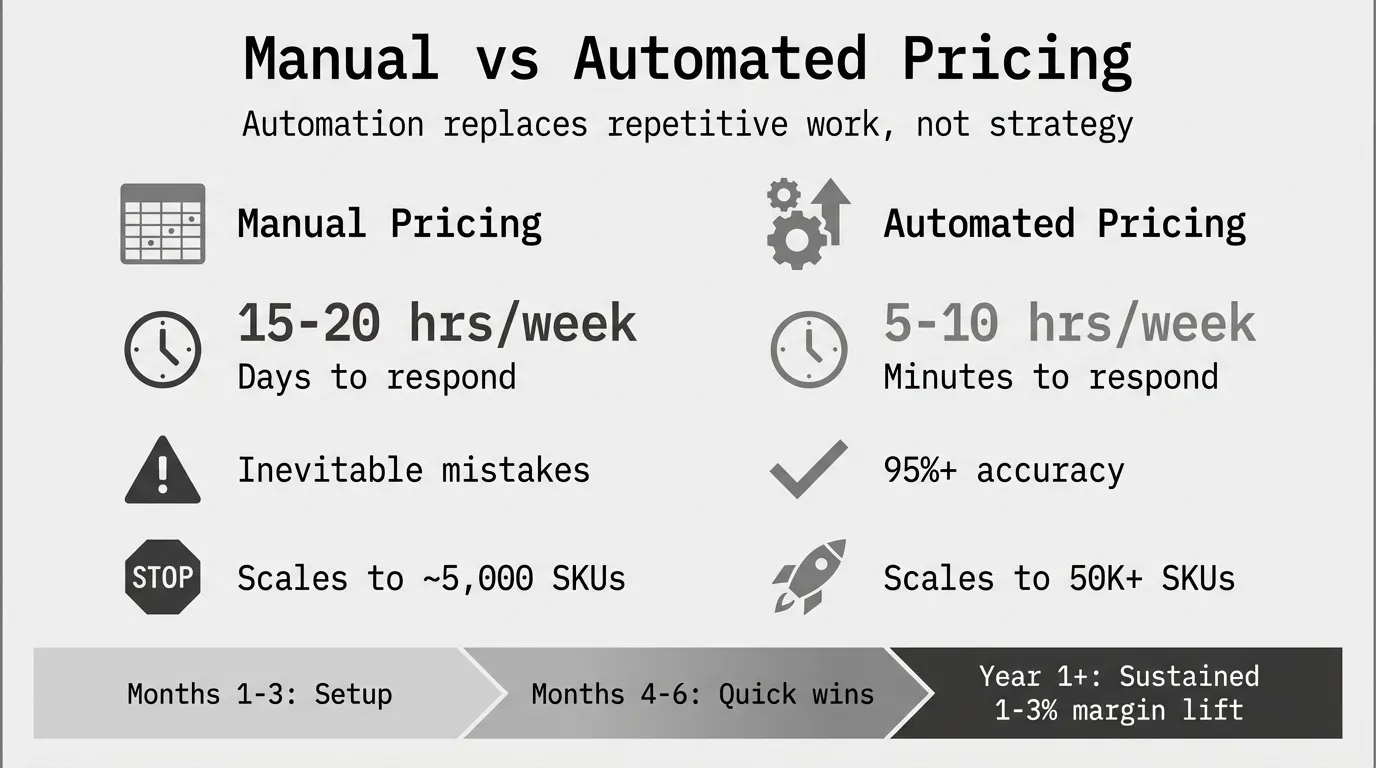
A seller with just 100 products across multiple marketplaces checking competitor prices, analyzing data, and making pricing decisions can easily consume 15-20 hours per week—time you could be spending on product sourcing, marketing, or business growth.
A distributor with 5,000 SKUs updated quarterly spends 40-60 hours per price list cycle on:
- Collecting cost updates from suppliers
- Calculating new prices with margin rules
- Reviewing exceptions and approvals
- Uploading to ERP and fixing import errors
- Communicating changes to sales team
Pricing automation reduces this to 5-10 hours for review and exception handling. The software does the calculation, validation, and distribution work.
Accuracy and Error Reduction
Manual pricing makes mistakes inevitable. A misplaced decimal point, outdated competitor data, or forgetting to update a price can result in significant losses.
Common manual pricing errors:
- Typing $85.00 instead of $8.50 (10x overpricing)
- Forgetting to update prices after cost increase (margin erosion)
- Applying wrong discount tier to customer (margin leakage)
- Using outdated competitor pricing from last week (lost sales)
- Copy-paste errors when moving prices between systems
Automated systems validate prices against business rules before publishing. If a calculated price violates minimum margin thresholds, maximum discount limits, or competitive positioning ranges, the system flags it for review instead of publishing a bad price.
Speed and Market Responsiveness
Manual pricing operates on weekly or monthly cycles. You check competitor prices Friday morning, update your spreadsheet, review with management Monday, upload to ERP Tuesday, and communicate to sales Wednesday. By then, the market has moved.
Automated pricing responds in minutes. When a competitor changes prices, the system detects it, calculates optimal response based on your rules, and updates your prices automatically if within approved parameters or flags for quick review if outside normal ranges.
According to Repricer analysis, manual pricing decisions may be thoughtful, but they are slow, while automation reacts instantly but requires careful configuration.
Scalability
Managing 500 SKUs manually is tedious but possible. Managing 20,000 SKUs across 300 customers with customer-specific pricing is impossible without automation.
TGN Data found that managing pricing manually becomes overwhelming as product catalogs and marketplace listings grow, but automation eliminates this challenge, allowing businesses to expand without adding to their workload.
Break points where manual pricing fails:
- 5,000+ SKUs with quarterly updates (160+ hours per cycle)
- Customer-specific pricing for 100+ customers (impossible to maintain consistency)
- Daily competitor price monitoring (full-time job for one person)
- Multi-channel pricing across ERP, e-commerce, and marketplaces (version control nightmare)
Types of Pricing Automation
Pricing automation tools fall into four categories based on use case, price velocity, and business complexity.
1. E-commerce Repricers ($50-$500/month)
Best for: Online retailers, Amazon/eBay sellers, high-velocity e-commerce
What they do:
- Monitor competitor prices continuously (every 15 minutes to hourly)
- Automatically adjust your prices to maintain competitive position
- Apply rules like "stay 5% below lowest competitor" or "match Amazon Buy Box price"
- Sync prices across multiple marketplaces in real-time
Examples: RepricerExpress, Seller Snap, Appeagle, Informed.co
Cost: $50-$500/month depending on SKU count and marketplace integrations
When it makes sense: You sell on Amazon, eBay, or other marketplaces where competitor prices change daily and Buy Box position determines sales volume.
2. Rule-Based Pricing Platforms ($20K-$100K/year)
Best for: Mid-market distributors, 5,000-50,000 SKUs, quarterly price updates
What they do:
- Apply cost-plus formulas, competitive positioning rules, and margin targets systematically
- Manage customer-specific pricing and contract pricing
- Generate price lists for review and approval workflows
- CSV-based integration with ERP systems
- Basic analytics showing margin by product, customer, and category
Examples: Competera, mid-market modules from Pricefx/Vendavo
Cost: $20K-$100K annually plus $10K-$50K implementation
Implementation: 1-3 months for setup, data integration, and training
When it makes sense: You've outgrown Excel, need systematic price list management across 10,000+ SKUs, and can justify $30K-$100K annually for 1-2% margin improvement.
3. AI-Powered Dynamic Pricing ($100K-$500K/year)
Best for: Large enterprises, 50,000+ SKUs, complex B2B pricing, real-time optimization
What they do:
- Machine learning models detect price elasticity and predict optimal prices
- Real-time pricing that adjusts continuously based on costs, competitors, inventory, demand
- Deep ERP integration with live data sync
- Advanced analytics including price-volume-mix analysis and customer segmentation
- Dedicated implementation teams and ongoing model training
Examples: PROS, Zilliant, Vendavo, Pricefx (enterprise tier)
Cost: $100K-$500K annually plus $300K-$1M implementation
Implementation: 6-18 months from contract to production use
When it makes sense: You have a full-time pricing team, clear ROI from 2-5% margin improvement on $100M+ revenue, and complexity requiring daily optimization across thousands of customer-SKU combinations.
See our guide on AI pricing for detailed comparison of AI vs rule-based automation.
4. CPQ-Embedded Automation (included with CPQ)
Best for: Complex quotes, configurable products, quote-driven B2B sales
What they do:
- Automate pricing within quote generation workflows
- Apply discount approval workflows that enforce margin thresholds
- Configuration-driven pricing for custom product builds
- Integrated with CRM for deal desk support
Examples: Salesforce CPQ, Oracle CPQ, ConnectWise CPQ
Cost: $75-$250/user/month as part of CPQ subscription
When it makes sense: You're already using CPQ for complex configuration and quoting. The pricing automation is more limited than dedicated platforms but sufficient if your main challenge is quote-to-cash workflow rather than price list optimization.
Real-World Results: What Margin Improvement to Expect
Research shows consistent patterns in pricing automation ROI.
Revenue and Margin Improvements
According to Vendavo, companies using pricing automation tools have reported revenue increases of up to 20% and profit margin improvements of up to 15% after implementing them.
However, these upper-range results come from comprehensive transformations combining automation with strategy changes, sales enablement, and organizational alignment. Most companies see more modest but still meaningful improvements.
Typical improvements by automation type:
| Automation Type | Margin Improvement | Timeline | Primary Drivers |
|---|---|---|---|
| E-commerce repricers | 3-8% revenue lift | 30-60 days | Faster market response, reduced stockouts |
| Rule-based platforms | 1-3% margin improvement | 6-12 months | Error elimination, consistent execution |
| AI-powered dynamic | 2-5% margin improvement | 12-18 months | Elasticity optimization, segment pricing |
| CPQ-embedded | 1-2% margin improvement | 3-6 months | Discount control, faster quoting |
Time Savings and Efficiency
Research on intelligent automation in financial processes found that businesses employing automation achieve accuracy gains of over 95% and processing time reductions of up to 75%, generating annual cost savings ranging from £300K to £8M depending on organizational size.
For pricing specifically, a distributor spending 40 hours per price list cycle (quarterly) reduces that to 10 hours with automation—saving 120 hours annually per person managing pricing. At $75/hour fully loaded cost, that's $9,000 in direct labor savings before accounting for error reduction and faster market response.
Break-Even Analysis
E-commerce repricer ($200/month = $2,400/year):
Break-even requires recovering $2,400 in margin or sales. A 3% revenue lift on $100K monthly sales ($1.2M annually) generates $36K additional revenue. ROI: 15x in first year.
Rule-based platform ($50K/year all-in):
Break-even requires $50K in margin improvement plus time savings. A 1.5% margin lift on $50M revenue generates $750K additional gross profit. ROI: 15x even accounting for implementation.
AI-powered platform ($200K/year + $400K implementation):
First-year cost: $600K. Break-even requires $600K margin improvement. A 2% lift on $100M revenue generates $2M additional gross profit. ROI: 3.3x in first year, improving in subsequent years.
According to financial automation research, businesses employing automation see an average return on investment between 30% and 300%, with a median ROI of 150% within the first year of deployment.
Implementation: How to Actually Automate Pricing
Pricing automation projects fail when companies treat them as software installations instead of business transformations.
Step 1: Audit Current Pricing Process (Week 1-2)
Document exactly how pricing works today:
- How do you get cost updates from suppliers? (Email, portal, CSV export?)
- How often do prices change? (Monthly, quarterly, annually?)
- Who calculates new prices? (Finance, product management, sales ops?)
- What systems store prices? (ERP, CRM, e-commerce platform, Excel?)
- How do price changes reach customers? (Email, portal, salesperson notification?)
- Where do errors happen most often?
This audit reveals what to automate first and where automation delivers fastest ROI.
Step 2: Define Pricing Rules and Logic (Week 2-4)
Pricing automation executes the logic you define. If your pricing logic is unclear, automation will consistently execute unclear pricing.
Critical rules to document:
- Cost-plus formulas: Standard margin by product category (e.g., safety products 35%, fasteners 28%)
- Competitive positioning: How to respond when competitors change prices (match, stay 5% below, don't respond)
- Customer-specific pricing: Which customers have negotiated pricing vs standard list
- Discount thresholds: Maximum discounts by customer type and approval requirements
- Floor prices: Minimum acceptable prices to prevent margin destruction
- Ceiling prices: Maximum prices before losing to competition
Step 3: Clean Data and Integrate Systems (Month 2-3)
Pricing automation quality depends on data quality.
Data requirements:
- Clean SKU master data (no duplicates, consistent naming)
- Accurate cost data (COGS updated within 30 days)
- Customer segmentation (size, industry, region)
- Transaction history (12+ months for elasticity analysis)
- Competitor pricing data (manual collection or automated scraping)
According to ERP integration research, disparate systems within organizations often lead to data silos where information is isolated and inconsistent across departments, complicating consolidation. Additionally, up to 40% of businesses go over budget during ERP integration due to unforeseen complexity in system customization and data migration.
Budget 2-4 weeks for data cleaning before connecting automation software to your ERP.
Step 4: Pilot on Low-Risk Segment (Month 3-4)
Test automation on a limited scope before full rollout:
- Pick 500-1,000 SKUs with good data quality and high transaction volume
- Select price-insensitive customers or products with clear competitive differentiation
- Run automation in "recommendation mode" where it suggests prices but humans approve
- Compare automated prices against manual process for 30 days
- Measure time savings, error reduction, and any negative customer feedback
If the pilot shows no time savings, too many errors, or customer pushback, fix those issues before expanding.
Step 5: Full Rollout and Change Management (Month 5-6)
Expand automation gradually:
- Train sales team on new pricing process and how to explain price changes to customers
- Establish exception handling workflows for unusual situations
- Create approval processes for prices outside normal ranges
- Set up monitoring dashboards tracking price changes, margin trends, and customer response
- Document new procedures for finance, sales ops, and product management
According to Pricefx integration guidance, while pricing-ERP integrations are mostly automated processes, they are still time-consuming and require significant effort to monitor for instances of data transfer errors.
Step 6: Continuous Monitoring and Optimization (Ongoing)
Automation isn't "set and forget." Markets change, costs shift, competitors adjust.
Monthly monitoring:
- Review prices flagged by automation as unusual
- Check margin trends by product category and customer segment
- Analyze pricing error rates and reasons
- Survey sales team on customer feedback about pricing
Quarterly optimization:
- Refine pricing rules based on results
- Adjust competitive positioning based on win/loss data
- Update cost-plus margins to reflect market conditions
- Add new product categories as catalog expands
When to Automate (and When Not To)
Not every company needs pricing automation. Here's the decision framework.
Clear Yes: Automate Pricing If
- You have 5,000+ SKUs with weekly or more frequent price updates
- You spend 10+ hours weekly updating prices manually
- Competitor prices change daily and you need to respond quickly
- You sell across multiple channels (e-commerce, ERP, marketplaces)
- Pricing errors are costing money (lost sales or margin leakage)
- You've already done basic margin analysis and know automation opportunities exist
Clear No: Don't Automate If
- You have under 1,000 SKUs with annual price updates (Excel works fine)
- Pricing is primarily negotiated deal-by-deal (automation doesn't help consultative selling)
- You don't have clean ERP data or consistent SKU management
- Your pricing strategy is unclear (automation will consistently execute bad strategy)
- Budget is under $5K (focus on diagnostics and Excel improvements first)
Maybe: Start with Diagnostics If
- You're in the 1,000-5,000 SKU range with quarterly updates
- You're not sure how much margin opportunity exists
- You suspect pricing problems but haven't quantified them
- Budget exists for software but not for a failed implementation
Run a pricing diagnostic first to quantify opportunities. Pryse provides margin diagnostics for $1,499—upload your transaction CSV, receive analysis in 24 hours showing where margin leakage occurs and how much is recoverable.
If the diagnostic shows $100K+ in recoverable margin from fixing obvious problems, then automation makes sense to scale and sustain those improvements. If opportunities are small, you've avoided wasting $50K-$100K on software you don't need.
Pricing Automation vs Related Concepts
"Pricing automation" gets confused with several related but distinct concepts.
Pricing Automation vs Dynamic Pricing
Pricing automation replaces manual work with software updates. It can be static (quarterly price list updates) or dynamic (real-time changes).
Dynamic pricing changes prices in real-time based on market conditions, demand, or competitor actions. It requires automation but automation doesn't require dynamic pricing.
Most distributors use pricing automation for quarterly price list updates, not real-time dynamic pricing. See our guide on dynamic pricing for when real-time price changes make sense.
Pricing Automation vs Price Optimization
Price optimization is the strategy and analysis to determine optimal prices (what prices should be).
Pricing automation is the execution mechanism (updating systems with those prices automatically).
You can have optimization without automation (manual Excel analysis and updates) or automation without optimization (automatically applying a bad pricing formula). Best practice: optimize strategy first, then automate execution. See our pricing optimization guide.
Pricing Automation vs CPQ
CPQ (Configure Price Quote) generates quotes for complex configurable products based on predefined rules.
Pricing automation updates base prices and rules that CPQ uses.
Many companies use both—pricing automation optimizes list prices and customer-specific pricing, CPQ applies those prices during quote generation. See our CPQ software guide.
Implementation Costs and Hidden Expenses
Software subscription is 20-40% of total automation cost.
Direct Costs
Software subscription:
- E-commerce repricers: $50-$500/month ($600-$6,000/year)
- Rule-based platforms: $20K-$100K/year
- AI-powered platforms: $100K-$500K/year
- CPQ-embedded: $75-$250/user/month (included with CPQ)
Implementation:
- E-commerce repricers: $0 (self-service setup)
- Rule-based platforms: $10K-$50K (1-3 months)
- AI-powered platforms: $300K-$1M (6-18 months)
Hidden Costs
Data integration and IT support:
Connecting automation software to your ERP, e-commerce platform, and other systems requires API configuration, testing, and ongoing monitoring. Budget $10K-$50K for mid-market implementations, $100K+ for enterprise.
Change management and training:
Sales teams need training on new pricing processes. Customers need communication about price changes. Finance and operations need new procedures. Budget 10-20% of software cost for organizational change.
Ongoing maintenance:
Pricing rules require updates as markets change. Data quality needs monitoring. Business rule adjustments happen quarterly. Budget 20-40 hours per month for ongoing optimization.
According to AI automation cost research, integration costs are often underestimated. Most projects exceed initial budgets by 20-40% due to unforeseen data quality issues, customization needs, and change management complexity.
Alternatives to Full Automation
Not ready for automation software? These approaches deliver 60-80% of the benefit at 10% of the cost.
Excel-Based Semi-Automation
Use Excel formulas to automate calculations while keeping manual review and upload:
- Import costs and competitor pricing to Excel
- Apply margin formulas automatically
- Flag exceptions (prices outside normal ranges)
- Review and adjust flagged items manually
- Export to CSV for ERP upload
This scales to about 5,000 SKUs before Excel performance and error risk become limiting factors.
Scheduled Scripts and Macros
If you're comfortable with basic programming, Python or VBA scripts can automate data collection and price calculations:
- Script downloads supplier cost files automatically
- Applies pricing formulas in code
- Generates price list CSVs for ERP import
- Runs on schedule (weekly, monthly)
This approach works well for straightforward cost-plus pricing without complex business rules.
Pricing Diagnostics Before Automation
Before investing in ongoing automation software, run a one-time diagnostic to confirm the opportunity.
Pryse's $1,499 diagnostic uploads your transaction CSV and returns:
- Margin analysis by product, customer, and category
- Identification of underpriced SKUs and customers
- Quantification of margin leakage sources
- Prioritized list of pricing adjustments
Most companies recover 3-10x the diagnostic cost by implementing top recommendations. If opportunities are small, you've avoided $50K+ in automation software costs.
Getting Started with Pricing Automation
Follow this sequence to maximize ROI and minimize risk.
For E-commerce Sellers (Immediate Action)
- This week: Sign up for a repricer trial (RepricerExpress, Informed.co)
- Week 2: Connect to Amazon/eBay, configure basic rules
- Week 3-4: Monitor results, adjust rules based on sales and margin data
- Month 2: Expand to full catalog if trial shows positive results
ROI appears in 30-60 days from faster market response and reduced stockouts.
For Distributors (Phased Approach)
- Month 1: Run margin diagnostic to quantify opportunities (Pryse: $1,499)
- Month 2: Fix top 10 margin leakage issues manually in Excel
- Month 3: If opportunities remain, evaluate rule-based automation platforms
- Month 4-6: Implement and pilot automation on 1,000 SKUs
- Month 7-12: Expand to full catalog with ongoing optimization
ROI appears in 6-12 months from sustained margin improvement and time savings.
For Manufacturers (Strategic Investment)
- Quarter 1: Document pricing strategy, rules, and current process
- Quarter 2: Clean ERP data, define automation requirements
- Quarter 3: Evaluate vendors, run pilots with 2-3 platforms
- Quarter 4-5: Implement chosen platform with phased rollout
- Year 2: Continuous optimization and margin improvement
ROI appears in 12-18 months from comprehensive pricing transformation.
Next Steps
Pricing automation delivers clear ROI when you have enough pricing complexity to justify software costs—typically 5,000+ SKUs or high-velocity price changes.
Before investing in automation, understand your baseline. Most companies discover margin leakage they didn't know existed.
Run a pricing diagnostic first. Pryse's $1,499 diagnostic takes 24 hours from CSV upload to results. You'll learn:
- Your actual margin by product and customer (most companies are surprised)
- Where margin leakage occurs and how much is recoverable
- Whether Excel, rule-based automation, or AI platforms make sense for your complexity
Start with diagnostics. Invest in automation once you've confirmed the opportunity and organizational readiness.
For companies ready to explore broader pricing optimization strategy beyond automation, see our complete pricing optimization guide covering frameworks, organizational design, and implementation best practices.
Sources
- Sciative: Manual Pricing vs. Automated Pricing - Why Automation is the Future
- DealHub: What is Pricing Automation?
- Repricer: Repricer vs. Manual Pricing - A Deep Dive Comparison
- TGN Data: Dynamic Pricing Software vs Manual Repricing
- Vendavo: Pricing Automation - The What and the Why
- ResearchGate: The ROI of Intelligent Automation in Financial Processes
- Rillion: ERP Integration - The Definitive Guide for 2025
- Pricefx: 3 Ways to Integrate Your ERP Systems with Pricing Software
- Medium: AI Automation Integration Costs - Hidden Expenses Revealed
Last updated: February 24, 2026
Frequently Asked Questions
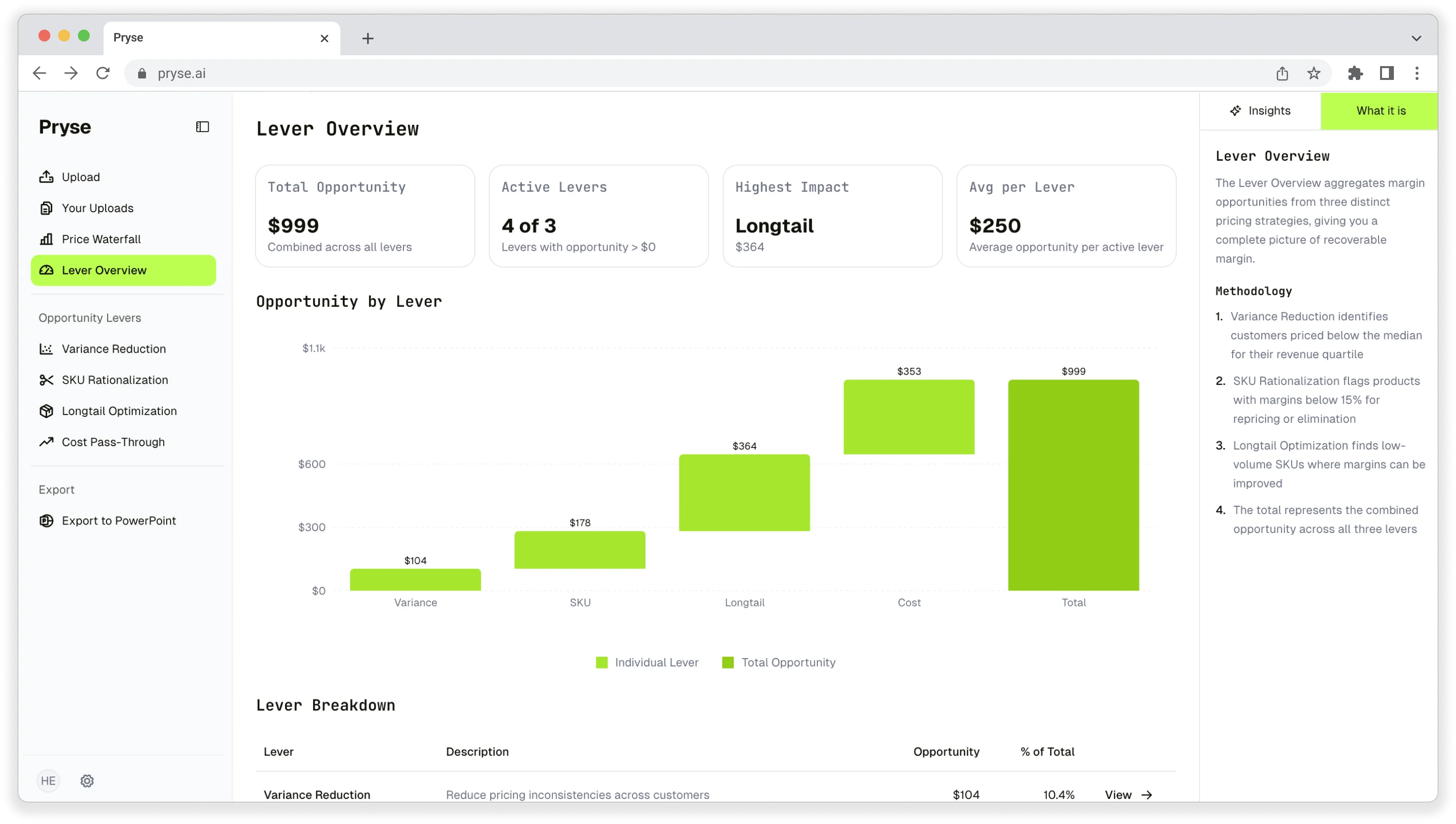
Want to analyze your entire product catalog?
Pryse automatically identifies margin leakage across thousands of SKUs. Upload your data and find hidden profit in 24 hours.
One-time $1,499 diagnostic. No subscription required.